MuniLink Book a walk-through

Audit evidence, ready before the auditors arrive.

Evidence tools for municipal finance teams. They check your registers and award files, flag the gaps, give every finding an owner and leave the sign-off with you.

Fictional SAMPLE data shown. Guidance only, not an audit opinion.
  • Built around what AGSA tests: 24 award file checks across six procurement stages
  • Runs in your browser. Your files stay on your machine.
  • Every finding gets an owner role, a target date and a status
  • Made in South Africa for MFMA municipalities

Five tools, one habit: find the gap before year-end.

Each one works on a single file or register at a time, so your team can check, fix and sign off in the same week.

What the film shows

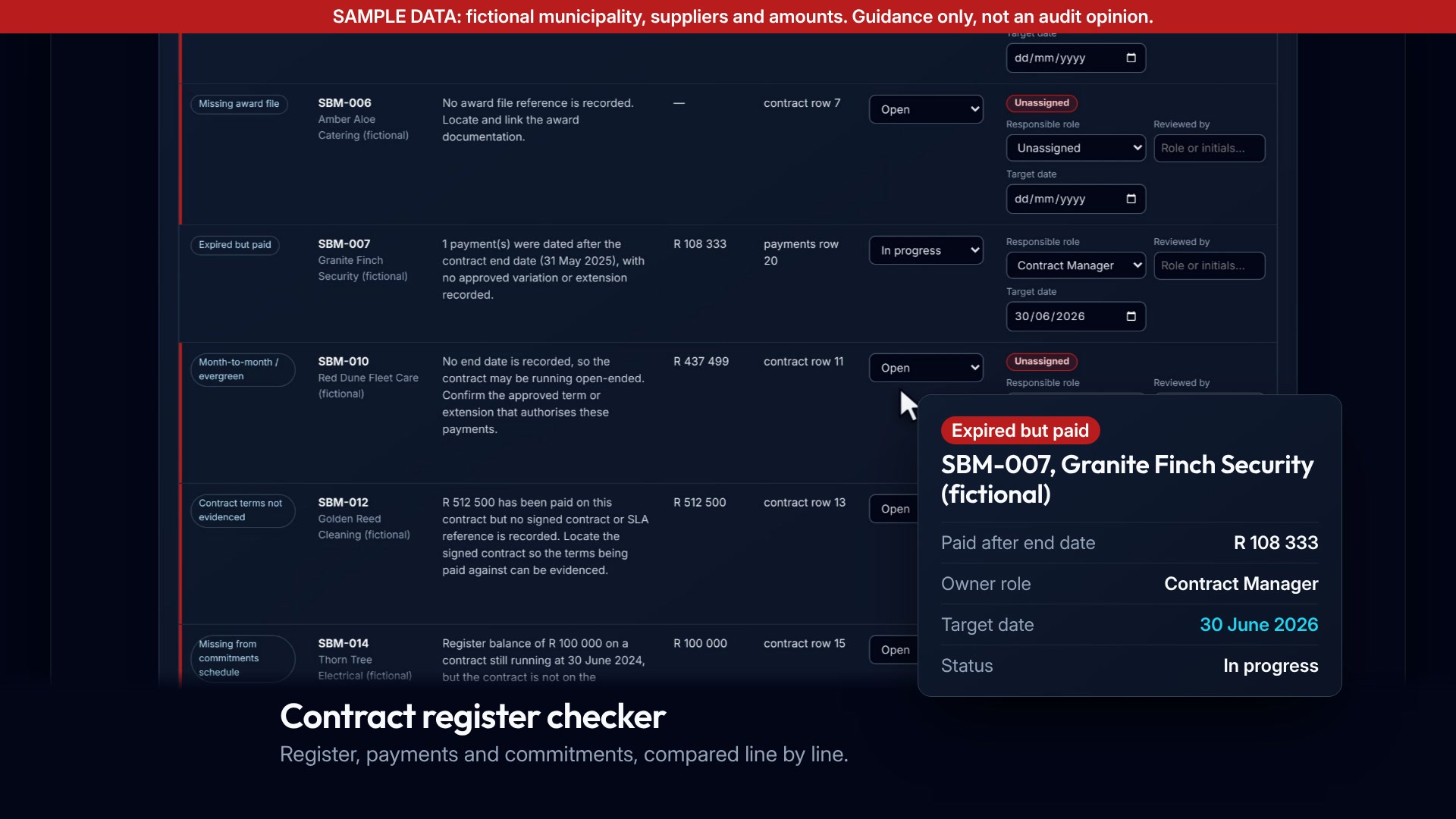
The real checker loads SAMPLE data and scrolls to the review flags. The "Expired but paid" row for SBM-007 lights up and the camera zooms in. An owner role (Contract Manager), a target date (30/06/2026) and a status (In progress) are set in the tool, and a card sums up the finding: R 108 333 paid after the end date.

Contract register checker Live

Compares your contract register, payments and year-end commitments schedule, and shows where they disagree.

  • Flags contracts that expired but are still being paid.
  • Finds month-to-month contracts with no approved term.
  • Lists commitments missing from the register.
Try it with SAMPLE data
What the film shows

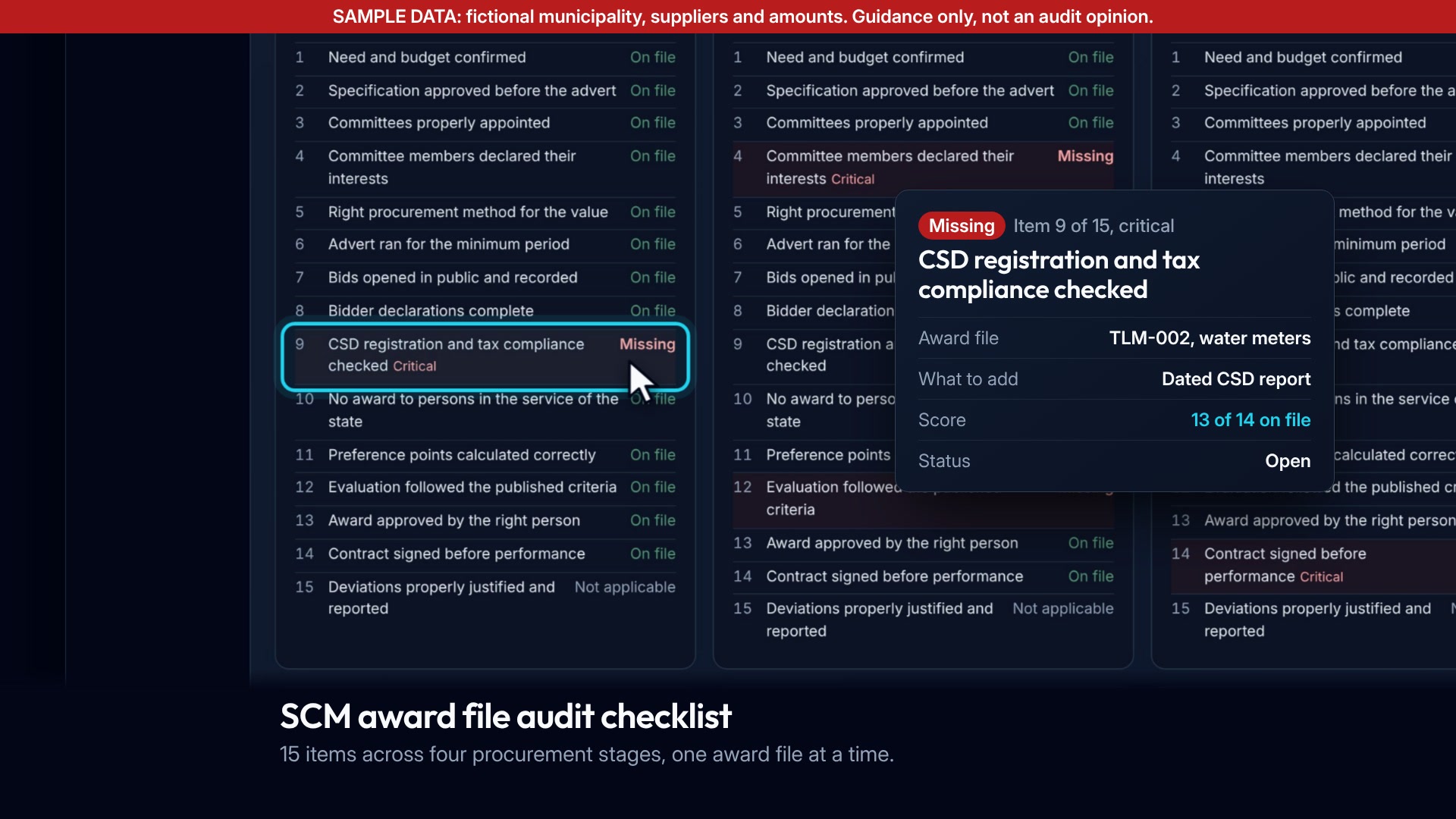
The award file evidence checker loads SAMPLE award files and the file scorecards appear. Item 9, "CSD registration and tax compliance checked", on TLM-002 is flagged Missing (critical). The camera zooms in and a card gives "13 of 14 on file", what to add and the status.

SCM award file audit checklist Live

Checks award files against 24 items across six procurement stages: check one file, or scan many at once.

  • Shows what is on file and what is missing, item by item.
  • Marks critical gaps such as a missing CSD report.
  • Gives a score per file and a list of gaps to fix.

24 itemsChecked per award file. SAMPLE files

Try it with SAMPLE data
What the film shows

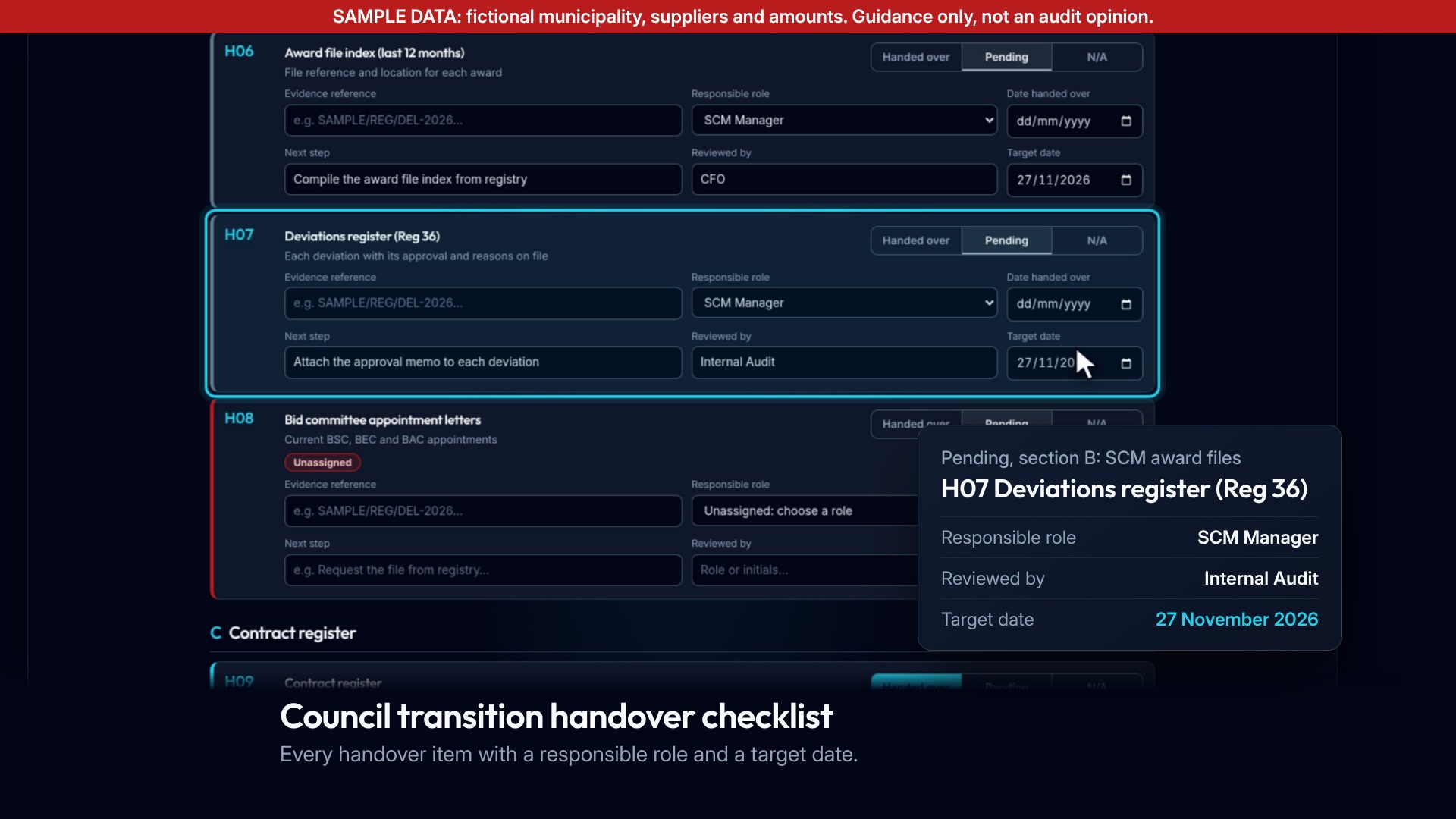
The live checklist loads SAMPLE data and scrolls to section B (SCM award files). H07, "Deviations register (Reg 36)", lights up and the camera zooms in. A card shows Pending, the SCM Manager as responsible role, Internal Audit as reviewer and a 27 November 2026 target date.

Council transition handover checklist Live

Keeps the handover between outgoing and incoming councils on one evidence list.

  • Every item has a responsible role and a reviewer.
  • Target dates and next steps on each item.
  • Prints a sign-off sheet.
Open the checklist
What the film shows

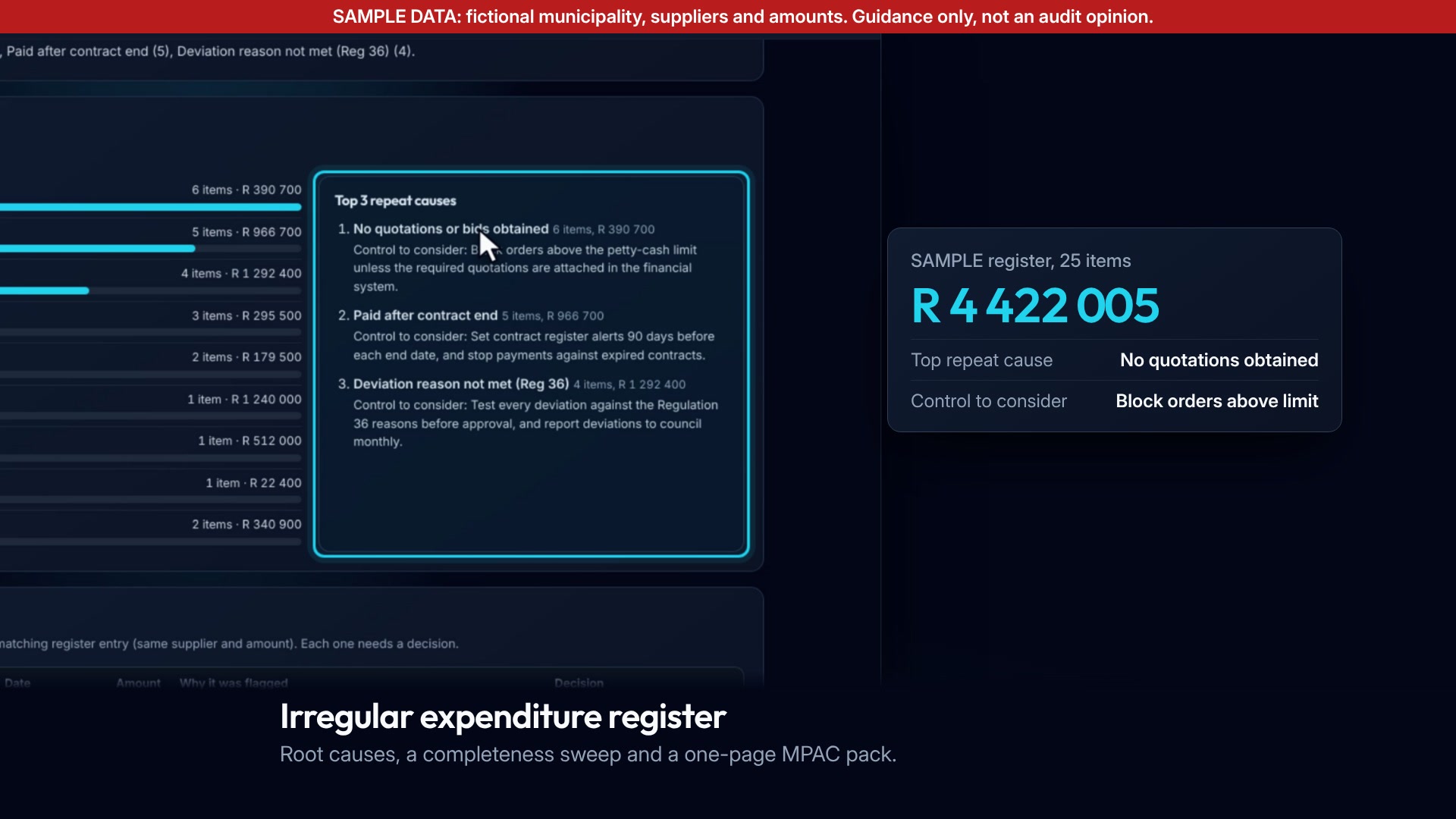
The register tool loads a SAMPLE register. "Top 3 repeat causes" lights up and the camera zooms in while a card counts up to R 5 240 100 (25 items). The camera then moves to "Possibly missing from the register", where a card counts up to 4 candidates worth R 381 000, each needing a decision.

Irregular expenditure register and completeness sweep

Turns the IE register into root causes, a completeness sweep and a one-page MPAC pack.

  • Top three repeat causes, each with a control to consider.
  • A sweep of payments that look irregular but are not in the register.
  • Owners and statuses, then a one-page pack for MPAC.

R 5 240 10025 items in the register. SAMPLE register

4 candidatesworth R 381 000, possibly missing. SAMPLE register

Book a walk-through
What the film shows

The CFO-office desk demo is asked "Is the 2025/26 irregular expenditure register ready for MPAC and the auditors?". It works through the register and lands on finding R-02, "Written off without an MPAC investigation". The cursor presses "Approve as CFO" and a chip shows "Approved by the CFO, 1 of 7". The seat chip moves to Audit coordinator and a concept card shows a draft reply to a request for information, built from three documents on file and waiting for sign-off.

Seat agents Concept

An evidence assistant for each office seat (CFO office, SCM, contracts, records, audit coordinator) that prepares the work and waits for your sign-off.

  • Reads the evidence on file and shows the line each finding rests on.
  • The AGSA request agent drafts replies to auditor requests from documents already on file.
  • Nothing leaves the desk without a person's approval.
Ask for the demo

From upload to MPAC in four steps

  1. Upload

    Drop in the register, payments or award file you already have. CSV or spreadsheet, nothing to install.

    SAMPLE award files loaded into the award file checklist, with item 9 on TLM-002 flagged
  2. Findings

    The tool compares the files and lists each gap with the line it comes from.

    The Expired but paid finding for SBM-007 in the contract register checker, on SAMPLE data
  3. Owners

    Give each finding an owner role, a target date and a status, then track it to closed.

    Handover item H07 with its responsible role, reviewer and target date, on SAMPLE data
  4. MPAC pack

    Print a one-page summary for MPAC and the audit committee, with the open items and who holds them.

    The top three repeat causes in a SAMPLE irregular expenditure register, each with a control to consider

Your team decides what each finding means. The tools only show where to look.

Built for the people who sign

CFO

See every open finding, its owner and its date before the audit file closes.

Open findings, SAMPLE data

FindingOwner roleTarget dateStatus
Expired but paidSBM-007, R 108 333Contract Manager30/06/2026In progress
Deviations register (Reg 36)Handover item H07SCM Manager27/11/2026Pending
CSD and tax complianceAward file TLM-002SCM ManagerNot setMissing

SCM manager

Check award files against the 24 items AGSA tests: one file at a time, or many at once.

MPAC

Get a one-page pack on irregular expenditure: causes, candidates and decisions.

Audit coordinator

Answer auditor requests from evidence already on file, with sign-off recorded.

Internal audit

Review the same findings list management uses, with reviewer fields on each item.

Your data stays with you

  • Runs in your browser. Files are read on your own machine and are not uploaded to MuniLink.
  • The demos and films use fictional SAMPLE data only: no real municipality, supplier or person.
  • Guidance only, not an audit opinion. The tools point to evidence gaps; your officials and the auditors make the judgements.
  • Built with POPIA in mind: no personal information is needed to run a check.

Runs in your browser

C:\Users\finance\Documents\2025-26\contract-register-SAMPLE.csv

Where the file is read
This computer
Sent to MuniLink
Nothing
Status
Files read locally

Book a five-file walk-through

Bring five award files or one register. We go through them with your team and show you where the gaps are.